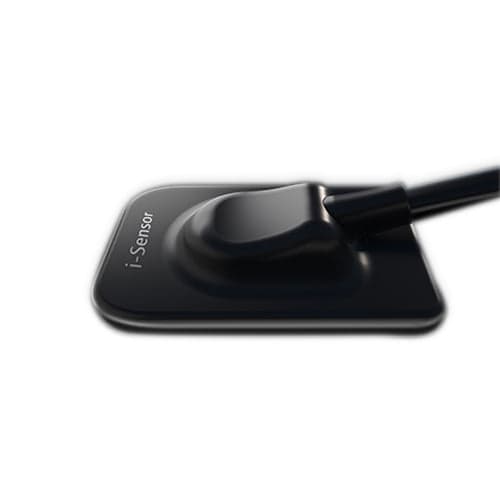
If you've been managing intraoral imaging for years, you probably remember when getting decent resolution meant fighting with film chemistry and darkroom time. The Woodpecker i-Sensor H2 changes that equation. It's a straightforward dental rvg x ray sensor that does what you need it to do without unnecessary complications.
The woodpecker x ray sensor itself is remarkably thin at 4.4 mm, which matters more than you'd think once you're positioning it in difficult cases. Your patients will notice the difference, especially those who gag easily or have limited opening. The CMOS technology captures solid diagnostic images at 25 lp/mm resolution. That's sharp enough for spotting caries, assessing bone levels, and planning treatment without wondering if you're missing something.
The quality of this woodpecker dental sensor construction is what makes it worth the money. It has been tested through more than 80,000 bend cycles, which means it will last in a busy practice. You don't have to worry about the disinfecting procedure hurting it because it has an IP68 waterproofing rating. That's real-world durability, not theoretical.
Product Uses
- Routine periapical radiography for caries detection, bone level assessment, and treatment planning
- Interproximal imaging for identification of proximal caries and assessment of crestal bone height
- Occlusal radiography for visualizing anterior and posterior tooth anatomy and developmental anomalies
- Post-operative imaging following restorative procedures, implant placement, and endodontic therapy
- Orthodontic treatment documentation and progress monitoring throughout active treatment phases
- Dental implant treatment planning, surgical guide verification, and post-insertion assessment
- Periodontal disease documentation for treatment planning and patient education purposes
- Endodontic working length determination and apical extent verification during root canal therapy
- Oral surgical assessment prior to extraction, impaction management, and bone augmentation procedures
- Follow-up imaging for monitoring healing after procedures and detecting delayed complications
How to Use
Pre-Installation Requirements
Before implementing the digital x ray sensor into your practice, verify that your computer system meets the manufacturer's specifications. Standard requirements include Windows-based operating systems with adequate RAM and storage capacity for image archiving. Confirm internet connectivity if cloud-based image storage or backup is intended. Review your practice management software documentation to verify TWAIN driver compatibility or contact your software provider for integration guidance.
Installation Steps
Download the latest imaging software from the official Woodpecker website or use the installation media provided with your sensor. Follow the on-screen installation wizard, selecting appropriate directories for software and image file storage. If your existing practice management system includes TWAIN integration, the woodpecker i sensor software will communicate directly without additional configuration. Install any provided drivers using administrator credentials to ensure proper hardware recognition.
Hardware Setup
Connect the USB power adapter to the sensor unit before powering on. Plug the USB data cable into an available computer port. Windows operating systems typically recognize the device automatically; if driver installation is required, the system will prompt you accordingly. Allow 30 to 60 seconds for complete hardware initialization before launching imaging software.
Sensor Calibration
Some installations require baseline calibration to establish optimal sensor response. Access the calibration function through your imaging software settings menu. Follow the on-screen instructions, which typically involve capturing reference images without any object blocking the sensor. This process ensures consistent gray-scale rendering and prevents image quality degradation over time.
Clinical Capture Workflow
Launch your imaging software and enter or select the patient record within your practice management system. Position the sensor intraorally using a conventional technique using positioning rings or holder systems. Confirm patient cooperation and breathing pattern before initiating exposure. Trigger the X-ray exposure via the software interface or foot pedal control, depending on your equipment setup. The sensor captures the image within milliseconds, and the radiograph appears on your monitor immediately.
Image Review and Processing
The captured digital x ray sensor image displays in the software viewer, allowing immediate zooming, contrast adjustment, and brightness modification without additional radiation exposure. Measure distances, angles, and landmarks using calibrated software tools. Compare current images side-by-side with previous radiographs if available. Review image quality for diagnostic adequacy before saving to the patient record.
Image Storage and Management
Save images to the patient file within your practice management system, ensuring automatic backup according to your system's configuration. The woodpecker dental sensor software supports export functions for referrals, consultation requests, or patient record transfers. Create organized patient folders or albums if your practice uses external image storage alongside your primary practice management system.
Product Features
- High-resolution imaging at 25 lp/mm theoretical resolution for sharp visualization of fine anatomical detail
- Advanced CMOS sensor technology delivering superior contrast resolution and reduced noise in diagnostic images
- Ultra-thin 4.4 mm sensor design minimizing patient discomfort and improving clinical access
- Proven durability through 80,000+ bend-cycle testing for long-term reliability in demanding clinical environments
- IP68 waterproofing rating protecting against moisture, and standard dental disinfection procedures
- Curved sensor edges and flexible cable design reduce patient trauma and improve handling ease
- TWAIN compatibility enables integration with virtually all practice management software platforms
- Server-based functionality supporting unlimited computer connections under a single software license
- USB power and data connectivity, eliminating need for separate power outlets
- FDA and Health Canada approval confirming safety and effectiveness standards
- Multiple size options, including H1, H1.5, and H2, accommodate varied patient anatomy and clinical preferences
Technical Specification
| Specification | Details |
| Power | 5V USB interface |
| Sensor Area | 26 x 36 mm (H2) |
| Pixel Matrix | 1300 x 1800 pixels (H2) |
| Pixel Size | 20 micrometers |
| Resolution | Greater than 12 lp/mm |
| Physical Dimensions | 340 x 31 x 4.5 mm (H2) |
| Weight | 158 grams |
| Waterproofing | IP68 rated |
| Durability | 80,000+ bend cycles |
| Available Sizes | H1, H1.5, H2 |
Handling Tips
- Keep the woodpecker x ray sensor clean and dry when it's not in use.
- Store it away from extreme temperature swings that could affect performance.
- Use a disposable barrier sleeve for each patient to avoid direct contact with the sensor surface.
- After each patient, wipe it down with approved dental disinfectant.
- Do not autoclave the sensor or submerge it in liquid sterilization solutions.
- Handle the cable gently to prevent internal wire wear. Routinely inspect connection points for any signs of strain or damage.
- Keep the USB connector clean and free of debris so data transfers stay reliable.
- Store the sensor outside of the immediate radiation field when not in active use to prevent unnecessary scatter exposure.
Product Packaging
This x ray sensor arrives with the necessary cable and power adapter included. You get installation media or download instructions, basic setup guides, and warranty documentation. Some packages include positioning ring adapters. Everything is packaged to protect the sensor during shipping.
Medical Disclaimer
This equipment is intended for professional use only by licensed dental practitioners. Proper training in dental radiography, radiation safety, and infection control protocols is mandatory. Users must comply with all federal and state radiation safety regulations. The manufacturer and seller assume no liability for injuries, complications, or diagnostic errors resulting from improper use, inadequate training, or failure to follow established safety and maintenance guidelines.
Certifications
FDA approval in the United States and Health Canada approval confirm that this meets regulatory standards for intraoral imaging equipment. They mean the device has been reviewed and meets established safety and performance requirements.
Warranty and Support
The manufacturer backs this woodpecker dental sensor with a standard warranty covering defects in materials and workmanship. That protection applies if you're following proper handling and maintenance guidelines. Damage from dropping, improper disinfection, or misuse isn't covered. Technical support is available through your distributor and directly from Woodpecker. Response times vary, but the most common issues get resolved quickly.
FAQ
Q: Who is eligible to purchase this device?
A: Sales are strictly restricted to licensed dental professionals, dental clinics, hospitals, and authorized medical equipment distributors. Proof of a professional license may be required.
Q: What X-ray systems is this compatible with?
A: The i-Sensor H2 is compatible with most standard dental X-ray generators.
Q: Does this require professional installation?
A: Yes. Installation by qualified dental equipment technicians is required to ensure proper setup, software integration, and safety compliance.
Q: Are there specific radiation safety requirements?
A: Yes. Users must comply with all federal and state radiation safety regulations, including proper training, equipment registration, and adherence to ALARA (As Low As Reasonably Achievable) principles.
Q: How is infection control maintained?
A: Apply a new disposable barrier sleeve for each patient. Following the procedure, disinfect the sensor using CDC-approved dental surface wipes. Never autoclave the sensor.
Q: What is the expected lifespan in a typical practice?
A: With proper care, the sensor is designed for long-term clinical use. The 80,000+ bend-cycle rating ensures high durability in demanding daily environments.
Q: Can multiple operatories use the same software license?
A: Yes, the software includes server-based functionality supporting unlimited computer connections under a single license, making it ideal for networked practices.
Q: Is this digital x ray sensor compatible with my practice management software?
A: Yes, the woodpecker i sensor supports TWAIN driver protocols, allowing seamless integration with virtually all modern practice management systems.
Conclusion
The woodpecker dental sensor has become a practical choice for practices that want reliable digital imaging without overthinking it. It delivers solid resolution for diagnostic work, doesn't break easily, and plays nicely with your existing software setup. The design shows someone actually thought about how dentists use equipment. It's compact enough for patient comfort, tough enough for a busy practice, and straightforward enough that you're not troubleshooting software quirks. If you're ready to move beyond film radiography or upgrade an aging digital system, this dental rvg x ray is worth serious consideration. The combination of durability, ease of use, and reasonable cost makes it a sensible investment for most practices looking for dependable intraoral imaging that just works.
-2025-12-04.webp&w=3840&q=75 "Woodpecker i-Sensor H2 Digital X-Ray Sensor - View 1")