Global Medical Equipment Exporter · UK · EU · Africa · GCC
Global Medical Equipment Exporter · UK · EU · Africa · GCC

1 / 4
ISO, CE Marked
Questions about this product?
— our team will reach out.
Therapy Equipments · Ultrasonic Therapy
1 & 3 MHz Ultrasonic Therapy Machine- 27 Program
$153
27 pre-set and manual treatment programmes: the programme selector cycles through 27 clinically-organised protocols plus a fully manual mode, allowing clinicians to apply evidence-based treatments without manually configuring each parameter.
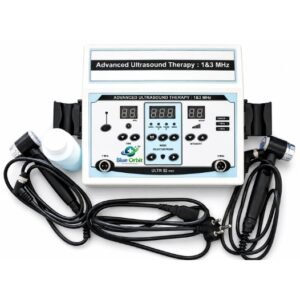
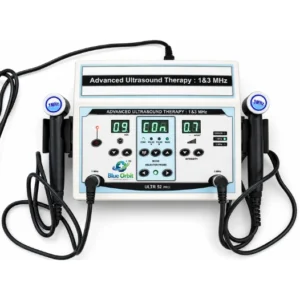
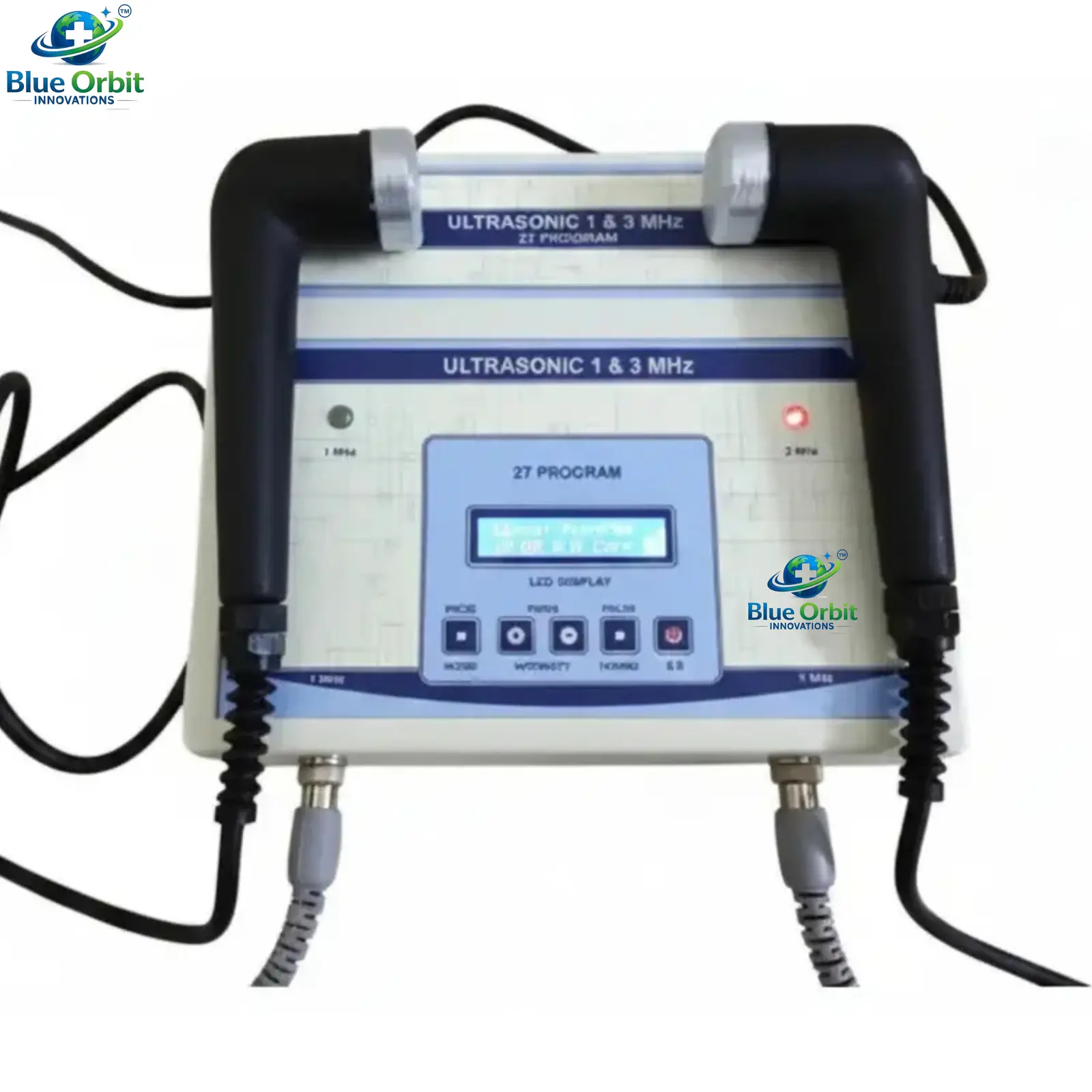
Dual 1 MHz and 3 MHz probes with frequency indicator LEDs: both probes connect simultaneously to dedicated bottom-panel output ports; active frequency is confirmed by illuminated 1 MHz and 3 MHz LED indicators on the front panel.
Backlit LCD display: the blue-backlit alphanumeric LCD shows the active programme name, timer countdown, intensity level, and treatment mode simultaneously for clear session monitoring.
Six-button front panel with logical grouping: Programme/Mode, Timer (+), Intensity (up/down), Pulse/1+3 MHz selector, and Start/Stop controls are clearly labelled in grouped clusters for intuitive one-handed operation during treatment.
Top Highlights
- Programmes
- 27 pre-set programmes plus manual mode
- Frequencies
- 1 MHz and 3 MHz (selectable, separate output ports)
- Display
- Backlit alphanumeric LCD (programme, timer, intensity, mode)
- Frequency indicators
- Dedicated 1 MHz and 3 MHz LED indicators
- Timer
- Built-in countdown timer (displayed on LCD)
- Output ports
- Dedicated 1 MHz and 3 MHz bottom-panel sockets
- Power supply
- Mains AC (110V / 220V, 50/60 Hz)
- Certifications
- ISO, CE marked, documentation available
Guaranteed Safe And Secure Checkout








This computerised ultrasonic therapy machine provides 27 pre-set treatment programmes alongside a fully manual mode, enabling physiotherapists to deliver standardised, evidence-based ultrasound protocols at the press of a button. Both a 1 MHz and 3 MHz probe are included and connect to dedicated output ports at the base of the unit, with active frequency confirmed by front-panel LED indicators.The blue-backlit alphanumeric LCD display shows the programme name, timer countdown, intensity, and mode simultaneously, giving the treating clinician a clear overview of all session parameters at a glance. Six logically grouped front-panel buttons control all functions, and the built-in countdown timer manages session duration automatically within each programme.
27
Pre-set programmes + manual
1 + 3 MHz
Dual probe frequencies
LCD
Backlit alphanumeric display
Timer
Automatic countdown per programme
Key features
1
27 pre-set clinical programmes
The Programme/Mode button cycles through 27 pre-set treatment protocols covering a wide range of musculoskeletal and soft tissue conditions, reducing setup time and supporting consistent clinical delivery.
2
Manual programme mode
In addition to the 27 pre-sets, a fully manual mode allows the clinician to set intensity, frequency, mode, and timer independently for bespoke treatment protocols.
3
Backlit alphanumeric LCD
The blue-backlit LCD displays the active programme name, timer countdown, intensity level, and current mode simultaneously for comprehensive at-a-glance parameter monitoring.
4
1 MHz and 3 MHz LED indicators
Dedicated LED indicators on the front panel confirm which probe frequency is active, providing a clear visual cue without needing to reference the LCD screen.
5
Dedicated bottom-panel output ports
Separate labelled 1 MHz and 3 MHz output sockets at the base of the unit allow both probes to remain connected simultaneously, with frequency toggled via the 1+3MHz button.
6
Intensity control
Dedicated intensity up and down buttons allow precise, incremental output adjustment during treatment without disrupting probe contact with the patient.
7
Pulse mode selector
The Pulse/1+3MHz button selects the pulsed output duty cycle, enabling the clinician to switch between continuous and pulsed waveform modes as required by the prescription.
8
Start/Stop session control
The S/S button initiates or pauses the treatment session and timer with one touch, supporting safe session management without altering any previously set parameters.
| Device type | Computerised ultrasonic therapy unit |
| Programmes | 27 pre-set programmes plus manual mode |
| Frequencies | 1 MHz and 3 MHz (selectable; separate dedicated output ports) |
| Frequency indicators | 1 MHz LED and 3 MHz LED on front panel |
| Display | Backlit alphanumeric LCD (programme name, timer, intensity, mode) |
| Timer | Built-in countdown timer; auto-set by programme or manually adjustable |
| Intensity control | Incremental up/down buttons; displayed on LCD |
| Output modes | Continuous and pulsed (selectable via Pulse button) |
| Output ports | 1 × 1 MHz socket and 1 × 3 MHz socket (bottom panel, labelled) |
| Power supply | Mains AC, 110V / 220V, 50/60 Hz |
| Enclosure | Desktop unit with top-mounted probe holders |
| Intended environment | Professional physiotherapy and rehabilitation clinical settings |
| Control | Function |
|---|---|
| LCD display | Shows programme name, timer countdown, intensity level (W/cm²), and current treatment mode simultaneously |
| 1 MHz LED indicator | Illuminates when the 1 MHz probe is the active output frequency |
| 3 MHz LED indicator | Illuminates when the 3 MHz probe is the active output frequency |
| PROG. / MODE button | Cycles through the 27 pre-set programmes and the manual programme mode |
| TIMER (+) button | Increments the session timer in manual mode; programmes set their own default duration |
| Intensity up button | Increases the ultrasonic output intensity in incremental steps |
| Intensity down button | Decreases the ultrasonic output intensity in incremental steps |
| PULSE / 1+3MHz button | Toggles the active output between 1 MHz and 3 MHz probes, and selects pulsed vs continuous output mode |
| S/S (Start/Stop) button | Initiates or pauses the treatment session and timer countdown |
| 1 MHz output socket (bottom) | Dedicated connection for the 1 MHz ultrasound probe cable |
| 3 MHz output socket (bottom) | Dedicated connection for the 3 MHz ultrasound probe cable |
| Condition / Area | Application / Protocol |
|---|---|
| Musculoskeletal pain management | Pre-set programmes for acute and chronic pain; 1 MHz for deep structures, 3 MHz for superficial tissue |
| Acute soft tissue injuries | Pulsed mode pre-set programmes for ligament, tendon, and muscle injuries to minimise thermal load |
| Tendinopathy and tendinitis | 1 MHz for deep tendons; 3 MHz for superficial; pulsed in acute, continuous in chronic presentations |
| Scar tissue softening | 3 MHz with continuous mode programme for superficial scar remodelling |
| Shoulder and rotator cuff conditions | 1 MHz for periarticular and capsular tissue; appropriate pre-set programme selected by clinician |
| Knee and hip pathology | 1 MHz for joint capsule, ligament, and periarticular soft tissue; pre-set or manual mode |
| Plantar fasciitis | 1 MHz probe at plantar fascia insertion; acute pain pre-set or manual pulsed programme |
| Sports injury rehabilitation | Programme and frequency selected by physiotherapist based on tissue depth and healing stage |
This 27-programme ultrasonic therapy machine is ISO and CE marked, confirming compliance with applicable European medical device directives for safety and electromagnetic compatibility. ISO and CE documentation is available on request for regulatory submissions, hospital procurement, and import clearance purposes.
ISO,
CE Marked
1
Connect the probes: plug the 1 MHz probe into the 1 MHz output socket and the 3 MHz probe into the 3 MHz socket at the base of the unit.
2
Power on: connect the unit to the mains supply and switch on. The LCD will illuminate displaying the last used or default programme.
3
Select programme: press the PROG./MODE button to cycle through the 27 pre-set programmes or select Manual mode. The LCD displays the programme name and pre-set parameters.
4
Select frequency: press the PULSE/1+3MHz button to select either 1 MHz or 3 MHz output. Confirm the correct LED indicator illuminates on the front panel.
5
Apply coupling gel: apply a generous layer of ultrasound coupling gel to the patient's skin at the treatment site before placing the probe head.
6
Set timer (manual mode): in manual mode, press the TIMER (+) button to set the desired session duration. Pre-set programmes apply their own default timer.
7
Set intensity: use the Intensity up button to increase the output to the prescribed therapeutic level as shown on the LCD display.
8
Start treatment: press S/S to begin. Move the probe continuously and slowly over the treatment area throughout the session.
9
End session: the unit will alert or stop automatically when the timer reaches zero. Reduce intensity to zero, press S/S to stop, remove the probe, and clean the probe head and patient's skin.
Important: Clinical note: all programme selection, frequency choice, and intensity settings must be prescribed and supervised by a qualified physiotherapist or licensed healthcare professional. Always maintain continuous probe movement during active output. Never hold the probe stationary on the patient's skin as this causes localised periosteal heating and tissue burns.
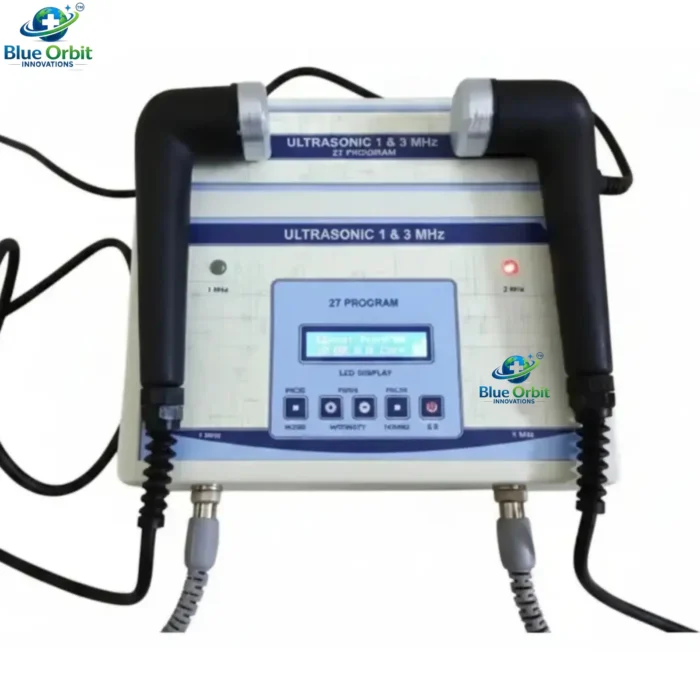
- 1 × Ultrasonic Therapy main unit (1 & 3 MHz, 27 Program)
- 1 × 1 MHz treatment probe with cable
- 1 × 3 MHz treatment probe with cable
- 1 × AC mains power cable
- 1 × user manual with programme guide
Clinical settings
Physiotherapy clinics
Rehabilitation centres
Sports medicine facilities
Orthopaedic departments
Pain management clinics
Hospital therapy departments
Occupational therapy units
Suitable for
Physiotherapists
Sports physiotherapists
Rehabilitation specialists
Occupational therapists
Osteopaths and chiropractors
B2B distribution
Medical equipment distributors
Hospital procurement teams
Physiotherapy equipment suppliers
Healthcare facility contractors
General Handling
✓ Handle probe heads with care; dropping or mechanical shock to the probe can damage the internal piezoelectric crystal, affecting output accuracy. ✓ Place the unit on a stable, flat, dry surface during operation and route cables safely to prevent trip hazards. ✓ Inspect both probe cables, connectors, and bottom-panel output ports before each session. ✓ Store probes in the top-mounted holders when not in use; never tightly wrap cables around probe handles. ✓ Store the unit in a cool, dry environment away from direct sunlight and moisture when not in clinical use.
Electrical Safety
✓ Connect to a correctly rated and earthed mains supply (110V or 220V) matching the unit's specification label. ✓ Never operate with a damaged power cable, plug, or probe cable; replace before use. ✓ Switch off and disconnect from mains before connecting or disconnecting probe cables at the base sockets. ✓ Do not use in wet environments or where liquid spillage may reach the unit, buttons, or output ports. ✓ Do not open the unit casing; refer all internal servicing to a qualified biomedical engineer.
Patient Safety
⚠ Always keep the probe in slow, continuous circular movement during active output; a stationary probe will cause localised heating and periosteal burns. ⚠ Confirm adequate coupling gel is applied before starting; the probe must maintain contact throughout treatment. ⚠ Verify that the correct programme, frequency, and intensity are set before pressing Start/Stop. ⚠ Stop treatment immediately if the patient reports burning, sharp pain, or unusual heat at the treatment site. ⚠ Do not treat over areas where the patient cannot reliably report sensation, as thermal damage may occur without warning.
Cleaning & Maintenance
Wipe both probe heads with a clean, soft cloth after each patient use to remove residual coupling gel; do not immerse probes in liquid. ✓ Clean the unit casing and top panel with a cloth lightly dampened with a mild disinfectant; do not allow liquid into the LCD screen, buttons, or base output ports. ✓ Inspect probe faces regularly for chips or pitting; a damaged probe face must be replaced before further clinical use. ✓ Schedule periodic output calibration and electrical safety testing by a qualified biomedical engineer in line with local clinical engineering standards. ✓ Maintain a service log recording calibration dates, probe inspections, faults noted, and corrective actions taken.
Regulatory notice: this device is for professional clinical use only. It must be operated, maintained, and stored in compliance with local medical device regulations. Output calibration should be verified periodically per local clinical engineering standards. Always follow the instructions provided in the supplied user manual and consult your regional regulatory authority for applicable compliance and registration requirements.
Questions
Frequently Asked Questions
The 27 pre-set programmes cover a range of common musculoskeletal and soft tissue conditions including acute and chronic pain, tendinopathy, scar tissue, shoulder, knee, hip, and plantar fascia conditions. Each programme pre-sets the appropriate combination of frequency, mode, intensity, and timer for that condition, reducing clinical setup time and supporting evidence-based treatment delivery. The full programme list is provided in the user manual supplied with the unit.
Yes. Cycling past programme 27 with the PROG./MODE button reaches Manual mode, shown on the LCD as "Manual Program". In this mode the clinician sets intensity, frequency, timer, and output mode (continuous or pulsed) independently to create a fully customised treatment session.
The front panel has two dedicated LED indicators labelled 1 MHz and 3 MHz. The illuminated LED confirms which probe output is currently active. Pressing the PULSE/1+3MHz button toggles the active frequency between 1 MHz and 3 MHz, and the corresponding LED changes accordingly.
The 1 MHz probe penetrates deeper into tissue (up to approximately 5 cm), making it suitable for treating muscles, deep tendons, and joint structures. The 3 MHz probe has a shallower penetration depth of around 1 to 2 cm and is best suited to superficial soft tissue conditions. The appropriate frequency is selected by the treating clinician based on the target tissue depth and clinical indication.
The 1 MHz and 3 MHz output sockets are located on the base (bottom) of the unit, clearly labelled. Both probes connect simultaneously and remain connected during use; the active probe is selected via the PULSE/1+3MHz button on the front panel.
Yes. CE marking documentation is available on request through SnapShopHub. Contact our export team with your specific regulatory and import requirements and we will provide the necessary paperwork to support customs clearance and local device registration.
Yes. SnapShopHub supplies single units for clinical evaluation as well as bulk quantities for hospital procurement, distributor orders, and clinic fit-out projects. Contact us for bulk pricing, lead times, and export shipping options to your destination.
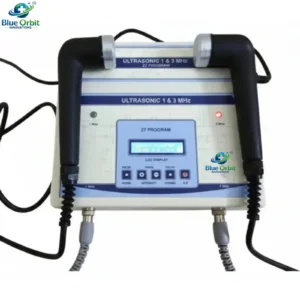
1 & 3 MHz Ultrasonic Therapy Machine- 27 Program
Programmes: 27 pre-set programmes plus manual mode
Quantity
Prefer a call instead? Request a callback